
|
|
Site Outages and Downtime |
|---|
|
Site Outages and Downtime
Introduction: Site Outages and Downtime: What is the difference between Site Outages and Downtime? The term downtime which known as system outage or system shortage is used to refer to periods when a system is unavailable. Our focus in this page is on the downtime due to internal and external Cyberattacks. We will not address the cost of downtime, but we will briefly present detections, prevention and remedy. What is the main difference between a process and a procedure? A process is a series of tasks that produce an outcome. A procedure is a set of instructions for completing a specific task within a process. Our Downtime Presentation Goal(s): Our goals presented in this page can be summarized as follows: • Present pictures of what we are trying to achieve • Build Downtime Structure Stages, Assessments and Alert Levels • Present the processes within these stages, Assessments and Alert Levels As for procedures within these processes, we need to work with clients to capture all the procedures details. What are the most common types of cyberattacks? 1. Malware 2. Denial-of-Service (DoS) Attacks 3. Phishing 4. Spoofing 5. Identity-Based Attacks 6. Code Injection Attacks 7. Supply Chain Attacks 8. Social Engineering Attacks 9. Insider Threats 10. DNS Tunneling 11. IoT-Based Attacks 12. AI-Powered Attacks 13. Zero-Day Exploit 14. Zero-Day Attack How often do businesses get hacked? An estimated 54 percent of companies say they have experienced one or more attacks in the last 12 months. Our Structure for Downtime: Why are structures so important? Having a structure in place can help with efficiency and provide clarity for everyone at every level. An effective organizational structure should result in each department within the organization becoming more focused and productive. Note: We would be focusing on Recovery from Downtime cases. Our Needed Structure: It is critical that we have plans, processes, procedure, tracking, audit trail, well trained staff, lessons learned, risks calculation and risks avoidance and Machine Learning analysis. Also, we should be updating everything we perform. In other words, we need to learn from our mistakes and as well as others. All these processes and the required steps would take time and no rushing these steps. Rushing would not result in any success of achieving our tasks. We need to give attention to details (careful, meticulous, scrupulous, and attentive). Without structure of hardware, software, processes, procedures and rest of the needed tasks, we would not be able to have effective, well-organized system to do our endless tasks. Therefore, we need a structure. Existing Structure: Any hosting would have all the needed software, hardware and experienced staff, but we need to structure our resources in more of doable tasks and steps. Our Downtime's Structure is makeup of the following: • Stages • Assessments • Alert Levels What is the difference between stages and phases? These words are similar but not the same. "Phase" is limited by time. For example, the first phase of the experiment will last two months. "Stage" carries the implication of something happening that will end and another stage will begin. Stages: Structuring of our thinking, management, tasks as well as all steps are critical. The following stages should be performed in the sequence listed: 1. Grouping Our Hosting Clients 2. Pre-Production 3. Production 4. Zero-Day Handling 5. Post-Zero-Day Handling Assessments: What is meant by security assessment? The testing and/or evaluation of the management, operational, and technical security controls in an information system to determine the extent to which the controls are implemented correctly, operating as intended, and producing the desired outcome with respect to meeting the security requirements for the system. Therefore, we need to differentiate between System Assessments based on the following: 1. External 2. Internal 3. Zero-Day One stage would have all these Assessments, for example, Zero-Day Handling stage may have all the listed Assessments. Alert Levels: We need to use the existing protocol for Alert Levels and present any unusual and potentially dangerous or difficult circumstances. We would be using the Five Color Alert Levels as follows: What Do the Different Alert Level Colors Indicate? GREEN or LOW: It indicates a low risk. BLUE or GUARDED: It indicates a general risk of increased hacking, virus, or other malicious activity. YELLOW or ELEVATED: It indicates a significant risk due to increased hacking, virus, or other malicious activity that compromises systems or diminishes service. ORANGE or HIGH: It indicates a high risk of increased hacking, virus, or other malicious cyber activity that targets or compromises core infrastructure, causes multiple service outages, causes multiple system compromises, or compromises critical infrastructure. RED or SEVERE: It indicates a severe risk of hacking, virus, or other malicious activity resulting in widespread outages and/or significantly destructive compromises to systems with no known remedy or debilitates one or more critical infrastructure sectors. #1. Grouping Our Hosting Clients' Stage Structure: What are the criteria for grouping clients? We would group cybersecurity clients based on the type of businesses that handle sensitive data, such as financial institutions, healthcare providers, manufacturing companies, and other industries. Customer Segmentation or grouping clients would target groups based on specific criteria. The criteria would be: • Type of the business • The size of business • Clients' customers' type • Colocation • The frequency of hackers' attacks • ... others Grouping clients would help identify hacked servers, routes, countries, location, hosting vendors, service providers, ... etc. In short, we would have a clear picture of who is who and their routing and servers' types, before the system is moved to production and available. 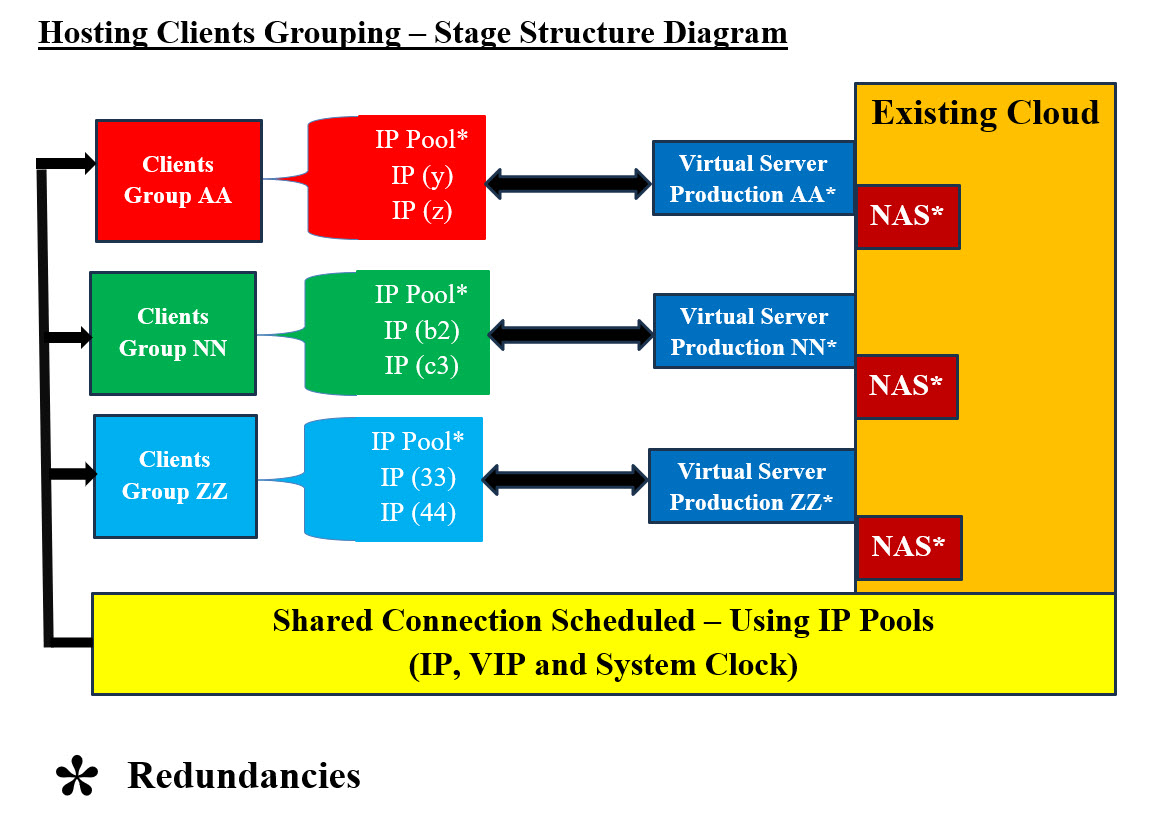
Hosting Clients' Grouping Structure Diagram - Image #1 Image #1 presents a rough picture of what Hosting Clients' Grouping Structure should be. Clients should be grouped according to a number of criteria. They should be assigned IP addresses-schedules to access the system. This means that at time X:Y:Z some of the clients (based on the grouping) would using IP address XYZ. At time N:F:B, the clients should switch to IP address NFB and so on. In short, clients would be using different IP addresses at prescheduled times. With same logic, the virtual production servers which would be switched to different bare-metal server using cloned virtual servers. The newly created virtual production server would be ready to take over the previous ones. This would render any continuous attacks or attempts to attack fruitless. The required processes for grouping clients and their corresponding virtual productions servers: 1. Clients should be assigned IP addresses-schedules to access their corresponding production servers 2. Virtual production servers would be available with assigned IP address 3. Switching to next scheduled IP address should be synchronized by both clients and production servers 4. Servers switched would be created on different bare-metal servers using cloned virtual servers 5. The newly created virtual production server would be ready to take over the previous ones 6. Assessments reporting would be done by both ends to ensure no issues The goal is keep the locations of production server moving-dynamic to a different server with a new IP address and not static nor a setting target. Data: Our approach to what we are presenting when it comes to data is: data processing and handling would be done as an independent intelligent data services and not dummy dump. Data would have its own virtual servers and not connected to the production server. It would be answering production system software calls-services as if data is an independent running tier and has no connection to the production server. See our documented pages at SamEldin.com. Cloning Using NAS: Cloning of virtual production servers can be done with copying the virtual running production server to NAS. We should (if feasible) be performing scanning for versus, malicious code, or issues without affecting system performance. The NAS copy of the virtual production server would be copied into a different bar-metal server with the new scheduled IP address. We are very much copying the previous production server as is (clone) to NAS. This hardcopy on NAS would be used to build the new virtual production server. Scanning the hardcopy should be done to ensure no malicious code or other issues. The performance of such processes need to optimized and to insure no performance issues. The server hardcopy on NAS can also be used to rollback and tracking of system issues and performance. Machine Learning (ML) would be using these hardcopies for further analysis. Redundancies: Images #1,2,3 and 4 have redundancies of resources which gives flexibility to the system and makes hacking mor difficult and fruitless. Shared Connection Scheduled - Using IP Pools: Our Packet's Payload Approach is presented in our Hosting Structure and Security presentation and the following is what we are presenting our Packet's Payload Cookie approach. Sending and Receiving Synchronized Communication Scheduling Parameters Table: We like to remind our audience-readers that we need build our system with constantly changing IP addresses for our clients to access our services. This means, for example at 3:10 PM CST our clients would able to Access IP Address (cloud server or site) number AA310.com. After 4:10 PM CST clients' browsers would automatically switch to cloud server-site BB410.com. We are assuming that our cloud services have more than one than server and more than one internet connection. At this point clients' computers and their internet service providers would be sending packets to a totally different route. The attacking hackers' servers and their damaged packets would be lost and have connection errors. In the case which we only have one server but with more than IP addresses. We would be dropping current IP address and witching to a new one. All the packet directed to the dropped IP address would be lost and the hackers' network would have connection errors since the dropped IP Address is no-longer working. In the case where hackers change or damage the Payload String, then our Cookie system would be able to figure out that there are issues and start the needed processes for handling the hacking attacks. Packets' senders and receivers should have synchronized schedule for sending and receiving packets. The following are some of synchronized parameters. At this point in time, we are open for brainstorming these parameters: 1. Time 2. Process ID 3. Cookie ID 4. IP Address 5. Encryption Index 6. Compression Index 7. Hash Index 8. Starting Route ID 9. Contact ID 10. Handling Processes Index - Detection Processes 11. Destination ID 12. Source ID
The goals of having the synchronization table is to keep hackers from knowing what IP addresses would be used next since both senders and receivers would changing IP addresses as time passes. In the case there is an attack, then receiver would be able to contact the senders and request that they change the communication IP address to the next scheduled IP. Also, Receiver would be able to send alarms to every concerned party involved. The Handling Processes Index ensures no guessing of what to do in case of an attack takes place. The indexes are used to have all the parties involved are on the same page and know what to do when it comes to Hashing, Compression, and Encryption. Note: Both the packets' senders and receivers should have the needed software or apps to handle the parsing and the processing of encrypted-compressed Payload string (data). We need to address that the hackers can obtain a copy of parsing and processing software or Apps. They can use reverse engineering to figure out the capabilities of these tools. Not to mention, hackers are using AI, therefore, we need to create these parsing and processing software or Apps using templates, encryption-compression keys and system clock as timestamps, which would make it almost impossible to break or even figure out. Note of caution, hackers can be supported by big business if not governments, therefore we need to have creative and dynamic thinking and learn from history, others and as well as our mistakes. 2. Pre-Production Structure Stage: This stage is more of "sport car revving the engine" and ready to go. In short, checking all the system components and system details. This must be signed by managers before loading into production. There must be a checklist for managers to sign off. We recommend automation of this checklist, where ML would be the one sending the requested for managers to sign. ML would be analyzing all the Big Data and tedious details. Pre-Production Processes: These processes should be completed, tested and signed off before the start of any production: 1. System should be finetuned and ready to run 2. System must be tested 3. Management signed off to go to production 4. Start Management tools-software 5. Ready state of all staff members 6. Start tracking 7. Start audit trial 8. Start Machine Learning tools 9. Assigned IP addresses-schedules to access the system 10. NAS processes and backup procedures should be ready and in place 11. Must have Redundancies of system components 12. Independent Virtual Data Services with its Virtual Servers should be ready We should not wait to be attacked and then react to such events. Sadly, a lot companies monitor their system by using their human-staff to figure out any changes. They do not use any automation nor Machine Learning to perform the data (Big Data) analysis on their system Assessments. Pre-Production Structure Stage Components: Pre-Production Structure Stage Components is presented in Image #2. The following is a list of Pre-Production Structure Stage Components plus we would need to add more components based in the business and hosting at hands. 1. Assigned IP addresses-schedules to access the system 1. Al the major components for system to run 2. Management System 3. Checklist for managers to sign off 3. Virtual Production Servers 4. Rollback Virtual Servers 5. ML Tools and Procedures 6. Audit Trail 6. Tracking 7. NAS for Backup and Rollback 8. IP Address Pools 9. Backup 10. Redundancies 11. Virtual Data Services Servers 12. NAS is the cloning agent for all Rollback and Backups 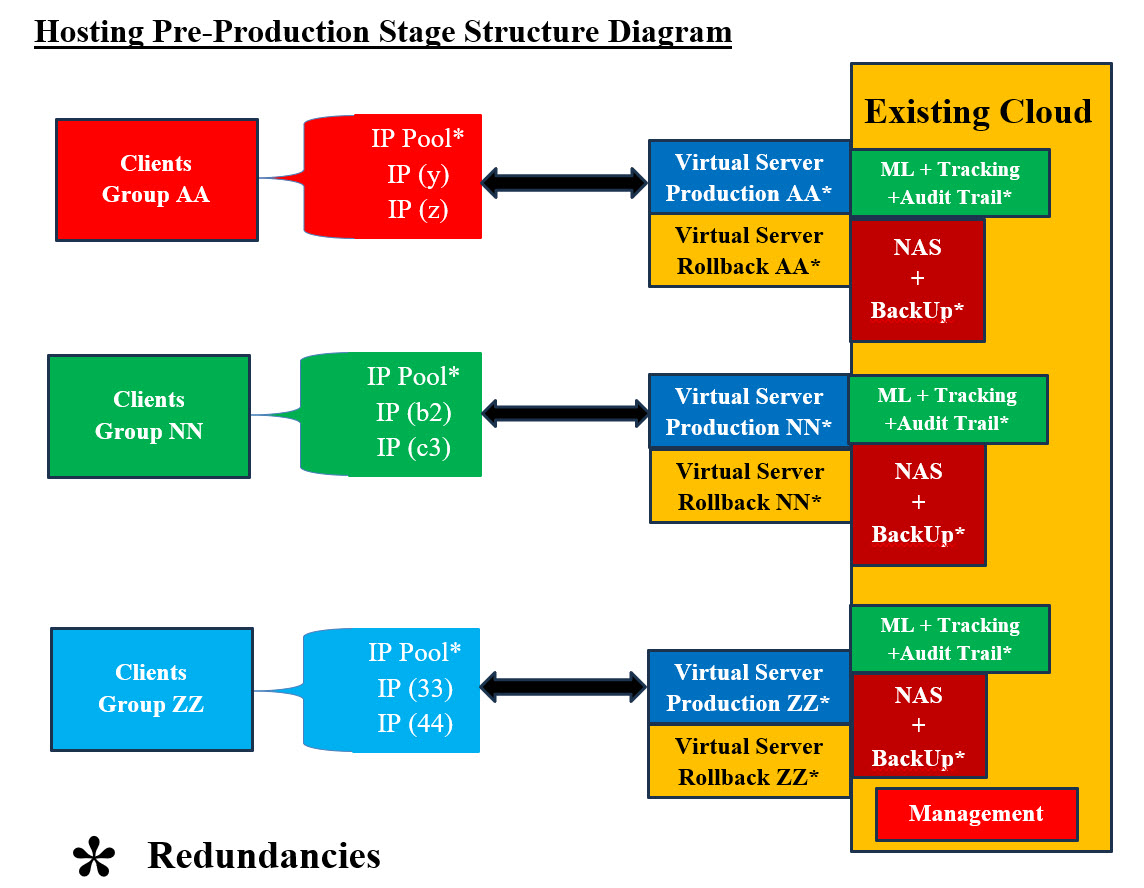
Hosting Pre-Production Diagram - Image #2 Image #2 has all the major components for system to run. Management, Virtual Production Servers, Rollback Virtual Servers, ML, Audit Trail, Tracking, NAS, IP address Pools, Backups, and Redundancies. Again, NAS is the cloning agent for all Rollback and Backups. 3. Production Stage: Pre-Production and Production stages are very much the something with the fact the production stage has real-live system where clients are accessing the system services. Image #2 presents both Pre-Production and Production stages. As for processes, we would be providing more details as we deal with clients. 4. Zero-Day Handling Structure Stage: What is zero-day attack? A zero-day attack is a cyberattack where a malicious actor exploits a software vulnerability or weakness that the software developer or vendor is unaware of. The term "zero-day" refers to the fact that the developer or vendor has "zero days" to fix the issue after learning of the flaw. "Houston, we've had a problem": This is a phrase that originated from the Apollo 13 mission in 1970, when astronaut Jim Lovell told Mission Control that the spacecraft was experiencing issues. The phrase is often used today to describe a downturn in any area of life, such as finances, health, politics, sports, ...etc. In Cybersecurity, "Houston, we've had a problem" is: Translated into: we have been attacked and we have no clue of what attacked our system nor what to do. Our answer to such case is "total bailout Processes": This means that we have to perform the following processes. - see Image #3: 1. Copy the production servers to NAS for further analysis by ML and other tools 2. Abended current IP address and switch to the next scheduled IP address 3. Backup data server to NAS 4. Scan the rollback virtual server for issues 5. Scan NAS Backup copy 6. Send alerts to all the clients and staff 7. Start "zero-day attack" procedures and processes 8. Run Prevention and Remedy processes and procedures 9. ML should analyze audit trail and tracking data matrices 10. Recreate Production and Rollback Virtual servers from the scanned backup NAS copy 11. Run "zero-day attack" Management procedures and processes 12. Redo "Hosting Pre-Production Structure Stage" to restart the system 13. These steps may have to be repeated until the "zero-day attack" is handled Note: In order not to lose any data or latest transactions, NAS backup copy and Virtual Rollback server should be scanned for issues. These two NAS copies should be a good start to recreate the last transaction when the system was hit. 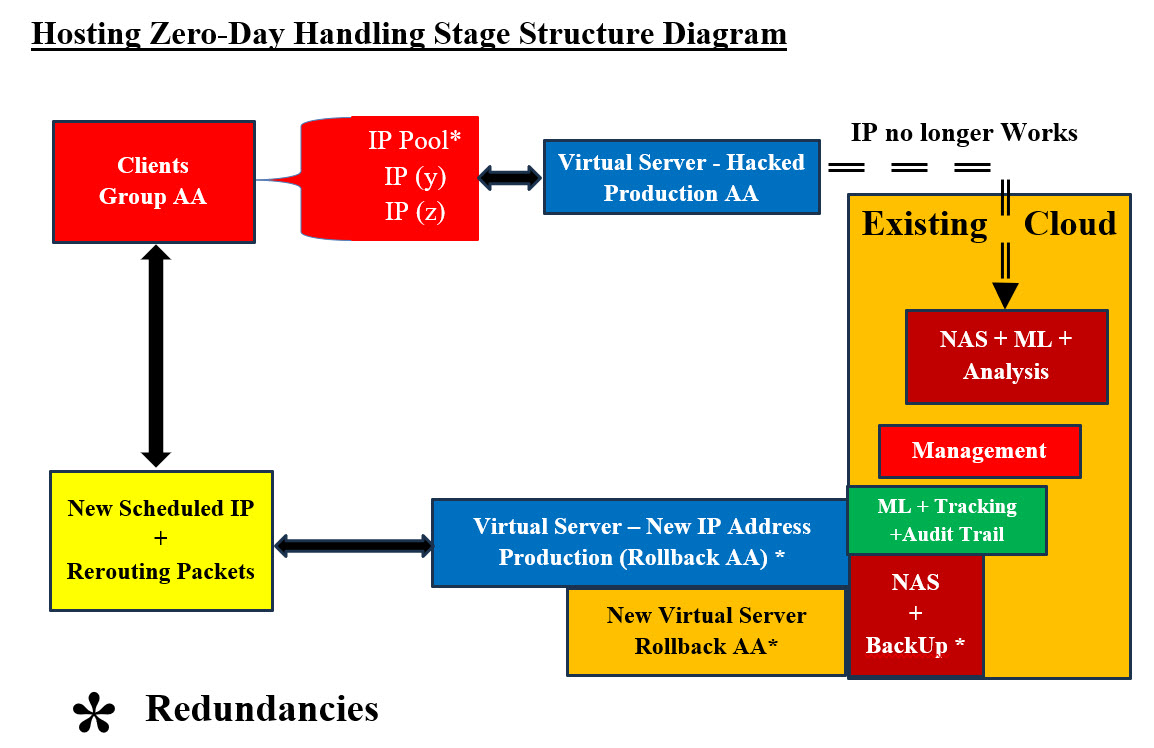
Hosting Zero-Day Handling Diagram #3 - Image #3 Image #3 presents a rough picture of the events which must take place. There also could be other events which we may not be aware of and they also need to be handled and tracked. Image #3 is stating: we would stop everything that is running and copy to NAS and do not promote the hacked system from running further. In short, freeze the running system and start a new one. The question here would be what if the new started system also has issues? The same processes should be repeated, but from the last point the system was running OK. Note: NAS would have copies of a number of previously saved runs. What if all attempts failed? We recommend Bailing out and move to a totally different remote site. 5. Post-Zero-Day Structure Stage: This stage is made up of two parts: • Analysis of what happed • Start a new production run with all the supporting components 
Hosting Post-Zero-Day Handling Structure Diagram #4 - Image #4 Image #4 presents a picture of would be done with the hacked system analysis and the starting a new system with a newly scheduled IP address and virtual support. Assessments and Alert Levels: What are the most common signs of Internal, External and Zero-Day Attacks? Internal, External and Zero-Day Attacks' Signs Table is a quick presentation of some of different attack types. These signs are not the only ones and there could be other signs also. The table would give some of issues which our hosting stages' Assessments would be addressing. As for Zero-Day attacks' signs, we used of the Reverse Engineering and Machine Learning approaches in their search for hacker's attacks signs.
Internal, External and Zero-Day Attacks Signs Table presents a rough picture of system signs which needed to be checked plus the detection processes should be started. Tracking, audit trial and human monitoring would be generating matrices for Machine Learning and cybersecurity staff to use in their respective analysis. We need both human and machine to be searching for signs. External and Internal Assessments and Alert Levels: Testing System Components: First, looking at any network, there are hundreds of thousands of items running on any giving network (software and hardware). To handle hundreds of thousands of items, automation is must ant not an option. Tracking or testing these items is a challenge. Divide and Conquer - Logical and Physical Units: Our approach is "Divide and Conquer". Therefore, we need start with one target network or small network and divide it into logical and physical units. We build what we call Matrices of processes or steps. For example, the following matrix in Component Testing Matrix - Images #5 would be used by human and machine to perform a number of tests or tasks. Any task or a test should be a small script which runs by human and/or machine. Such script should return a value to the caller for tracking and feedback. The script starting and the ending time is critical in evaluating performance. Not Applicable (N.A.) would be used so we can build big matrices with Nemours items. Some tests may not be applicable by some items. System Components' Testing Check List Matrices: We need to identify all possible hacking signs and their corresponding testing and detection. We need to develop automated and manual test matrices for all software and hardware system components. Both ML and Testers would be populating theses matrices. The test result would be: • Pass (P) • Fail (F) • Not Applicable (NA) Any item can be an entry in a logical as well as a physical unit. Therefore, we can check the physical or logical independently at our convenience. The scoring or performance is critical to our intelligent analysis and processes. The manual testing of these matrices must be manageable and doable by human. As for the machine testing, the sky is the limit to number and frequencies of testing as long as the testing does affect system performance. Virtualization can also play a big role in testing. We can clone the tested unit on a virtual server and run with such virtual server and perform anything we wish to test with such virtual independent server. Virtual testing would not interfere with system performance. Intelligence: To simply intelligence in our case, we are using the data we have collected from these matrices to run a number of scenarios (100 or more) and give each scenario a score or a grade. Based on the score, the machine would be able to make a decision, but in reality it is a calculated guess (100 or more). Since, we have the data for recent events plus history of previous events, then our machine would be able to perform cross reference, deduction, probability, decisions, statistics, reports and find frequencies, patterns and tendencies. Total Score and Alert Levels: Each component Testing would have a total score for further analysis. The test score can be used to flag any issues to start the detection processes. Alert Levels: Our Alert Levels are: 1. GREEN or LOW 2. BLUE or GUARDED 3. YELLOW or ELEVATED 4. ORANGE or HIGH 5. RED or SEVERE Based on testing score, both ML and Human Testers would be assigning Alert Levels. We also need to compare both Alert Levels and figuring out the correct respond plus correct any issues with our testing. Test ID and Scheduled Test Time: We need to build Test ID and its Timestamp based on scheduled testing. Cross-refence the ML matrices and Testers Matrices for further analysis and possibility of raising red flags.
Zero-Day Assessments and Alert Level: Zero-Day Exploit and Zero-Day Attacks are considered to be worst-case-scenarios and they may go unnoticed and their danger may linger for any length of time. Therefore, we are trying to address them as follows: 1. Taking a shot in the dark 2. The usual suspects 3. To leave no stone unturned 4. Reverse Engineering 5. Closing all holes and gaps 6. Keep on eye interfaces and exchange 7. Human guts feelings 8. Misc What we just listed sounds like a movie theme or fancy story. Our attempt here is turn every point or idea listed into science, algorithms, math equations and so on. Our SamEldin.com has a number of pages answering such issues or dilemma. See the following links: • Our Cybersecurity Video Scripts Structure© • Security for Oil and Gas Refinery • Compression-Encryption Cyber Security Chip Our Prevention and Remedy Approach: The following is our prevention and remedy processes for addressing cyberattacks:
It is critical that we have plans, processes, procedure, plus the staff have done some serious tracking. Nothing is left reacting to events. We should always plan for worse and hope to best. |
|---|