
|
|
Using Virtualization in Cybersecurity |
|---|
|
Using Virtualization in Cybersecurity
What is Virtualization? Virtualization or virtual system is a simple and a powerful concept. Virtual means it only exists in a computer memory. All programs, images, sounds .. etc are virtual objects. Turning off a computer would results in the loss all the memory contents which are the virtual objects. To bring any virtual object back, it has to be loaded back into the computer memory. 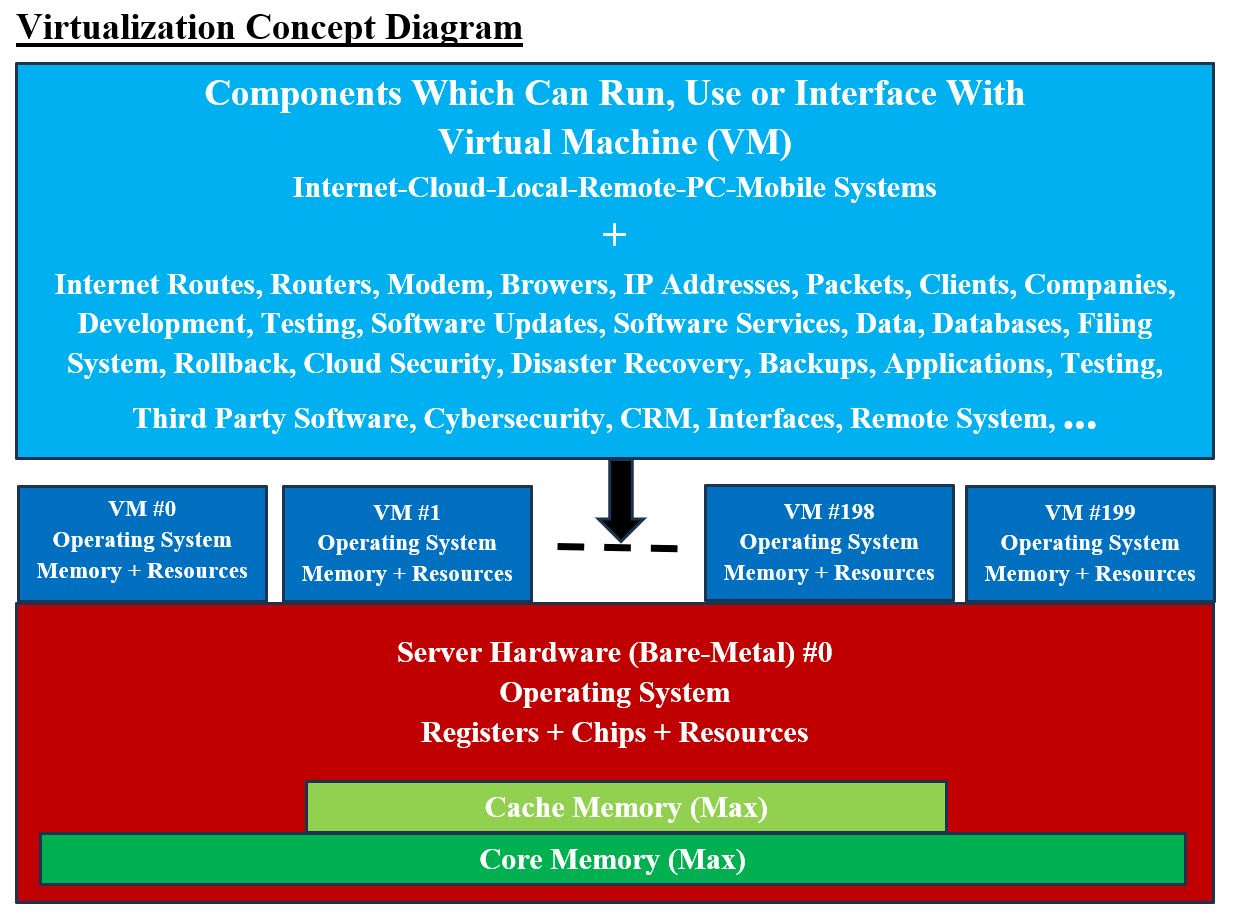
Image #1 Image #1 presents a rough draft of the Virtualization Concept and Virtual Machines (VM). It shows one hardware (bare-metal) server #0 can be used to create 200 Virtual Machine (VM) (based available memory and speed of CPU). The main difference between the hardware server and VM is: the hardware server has registers, Cache memory, chips (includning CPU), core memory plus all the hardware such as data bus and so on. On the other hand, a VM can run as if it is a hardware server with its own Operation System and memory plus resources (shared or dedicated). VMs can be created to run, use or interface with literally any software or hardware. VMs also can be created and removed dynamically on the run. VMs can be used as buffers to separate between systems, servers or even storage. Such flexibility can be used by Cybersecurity to prevent hackers from accessing internal system. VMs creation and removal from their existence can be done on the fly. VMs are extremely useful when it comes to testing and implementations of software. When it comes to Virtualization, literally the sky is the limit: With virtualization, we can create the following: • Virtual Networks • Virtual Devices • Virtual System • Virtual Buffers • Virtual database servers • Virtual tiers • Virtual Business Units • Virtual services • Virtual Firewalls • Virtual Routers • Virtual Modems • … Hypervisor: hypervisor as a special kind of software to allocate resources. The hypervisor interacts directly with the physical server and works as a platform for each virtual server where each server has its won operating system. OS Level Virtualization: OS level virtualization does not even use a hypervisor at all. Virtualization capability is part of the host OS which performs that kind of functions that a fully virtualized hypervisor would. Clones: A clone is hardware or software that is designed to function in exactly the same way as another system. In Image #1, VM #2 and VM#X? could be clones of VM#0. Note: The dedicated programs running in VM#0 must be developed with cloning in mind to prevent untraceable errors. Number of Virtual Servers: Images #1 presents one physical server with 200 VMs. We would be able to create one or more virtual servers which would mimic the physical server. Each of virtual server is an independent running server. Each virtual server can run any number of applications. Automation and One-Push-of-Button: With automation and virtualization, any number of virtual servers can be create and released with One-Push-of-Button. One-Push-of-Button means that we would be creating a program, a batch or an OS script. When it is executed, it would create or release X number of virtual servers. We recommend that a GUI interface would be created to automate the One-Push-of-Button processes. The only limitation on how many virtual servers which would created-released on the run is the capacity of the physical server (Bare-Metal). Speed: The speed of creating-releasing virtual servers depends on the number of CPU and their speed plus the OS scripts used. Power of Virtual System Any hardware, software, firewalls or connections can be emulated, created or mimicked by software. Therefore, Virtualization is a very powerful concept and a tool. Servers, system, connections, networks, clusters of networks or any software can be created-released virtually in any number and on any Bare-Metal servers or even virtual servers. With automation and virtualization, virtual system would provide the followings: 1. Flexibility Flexibility is shown with the ability to create-release any number of virtual servers where each would have its own environment including any operation system (Linux, Unix, Windows, Solaris) and run different applications. Each virtual server is an independent system and only shares resources with other virtual servers. 2. Redundancy Redundancy is the duplication of critical components or functions of a system with the intention of increasing reliability of the system. It is usually in the form of a backup or fail-safe, or to improve actual system performance. Redundancy helps create any number of virtual servers without spending too much money on extra hardware. Having multiple virtual servers that all run the same application is a safer method because if any of the servers should fail, a second server can quickly take its place. 3. Reducing Cost With ability of create any number of virtual server which mimics physical server, this would reduce the need to have additional physical server. It would also reduce the needed power to run and cool the physical plus the space to host these physical servers. 4. Consolidation Instead of having multiple physical servers which each can run only one application, a single server can run multiple virtual environments and utilize more of the servers processing power. Having a lot of physical servers can be expensive and time consuming to maintain while also taking up a lot of space. Virtual servers give companies the opportunity to consolidate their equipment and use it much more efficiently. 5. Emulating Hardware Virtual Machine (VM) can be described as a software program that emulates the functionality of a physical hardware or computing system. It runs on top of an emulating software called the Hypervisor, which replicates the functionality of the underlying physical hardware resources with a software environment. Emulation refers to the ability of a computer program in an electronic device to emulate (or imitate) another program or device. Many printers, for example, are designed to emulate HP LaserJet printers because so much software is written for HP printers. 6. Vertical and Horizontal Scaling Vertical Scaling is adding resources to a system unit to increase performance. Horizontal Scaling is adding more units to the system. With Virtualization both Vertical and Horizontal Scaling can be automated with One-Push-of-Button. 7. IP Addresses A virtual IP address (VIP or VIPA) is an IP address that doesn't correspond to an actual physical network interface. Uses for VIPs include network address translation (especially, one-to-many NAT), fault-tolerance, and mobility. 8. Virtual Address A virtual address space or address space is the set of ranges of virtual addresses that an operating system makes available to a process. 9. Development, Testing, Production, Post-Production Servers plus Infrastructure Support With virtualization any number of servers plus any types of server can be created-released with One-Push-of-Button. Infrastructure support can also be automated. 10. Rollback Rollback can be a simple as changing the IP address of a virtual server to old or previous IP address. 11. Virtual Application Servers Again the One-Push-of-Button concept can be used to create any number of any types of application servers. 12. Virtual Network and Clusters A Network is all the running hardware, software, interfaces, wiring, IP addresses, licenses and anything any network requires. A cluster is a number of networks working together for common computing purpose. With virtuality, a virtual network with virtual routers and emulated hardware can be created. A group of virtual networks would be grouped into a virtual cluster. 13. Security To cover security (in this page) using virtual servers and virtuality would require more effort and time. Simply put, the creation of virtual firewalls, proxy servers and networks would help in creating a security buffer to any existing network. Limitation of Virtualization: Virtualization is not a new concept, but it is not fully understood by IT community. The following are bullet-points of its limitation and we would provide more details in other pages: • System Management • Resource Management • Complexity and simplicity • Communication • Bottlenecks • Interfaces • Automation • Infrastructure Virtualization and Cybersecurity: To be able cover the subject(s) of Virtualization and Cybersecurity with all their ends and outs, we would need a lot more than one webpage and one video. We believe the best approach and hopefully the shortest presentation is that we would like to present a number of 2,000-foot views images of our views of Virtualization and Cybersecurity. See the following images and their short descriptions: • Virtual Production and Virtual Rollback and Virtual Outsource Testing • Dental Implants Platform • Virtual Monolithic (Big Container) • Virtual Modeling and Testing • Development Environment • Reverse Engineering Evaluation and Testing 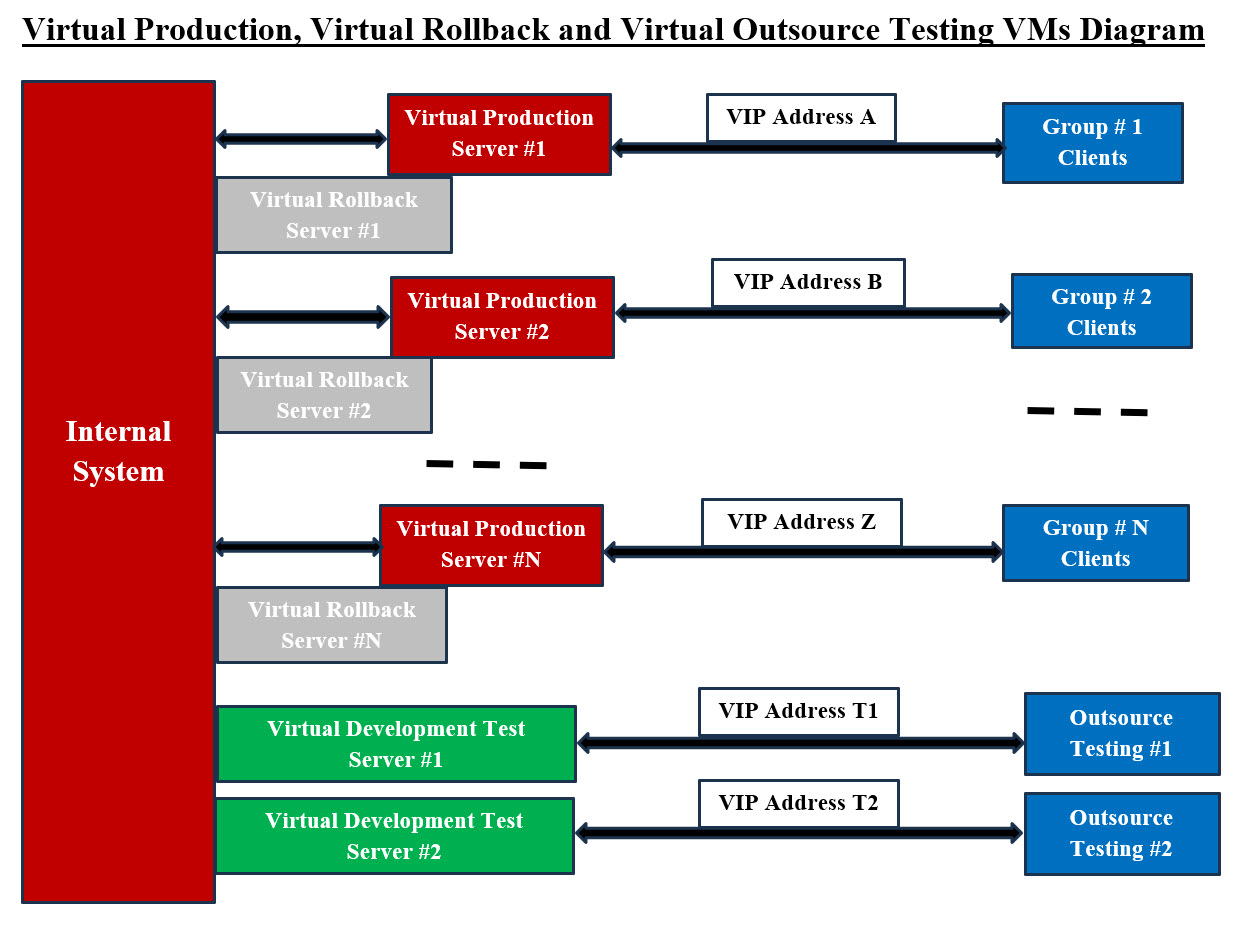
Image #2 Image #2 presents a structured way of handling the following hackers' attacks: • Denial-of-Service (DoS) Attack • Distributed Denial of Service (DDoS) • Man in the Middle • TCP SYN Flood • Ping of Death • Spoofing The main goal of these hackers' attacks is designed to overwhelm or interrupt the resources of a system to the point where it is unable to reply to legitimate service requests. Our proposed remedy is the following: As common practice when it comes to saving files: "Save early and save often" In here, we call it: "Change VIP early and often." Our proposed procedures are: 1. Divide clients into groups with similar requests or services – Colocations 2. Bigger clients may have their dedicated services 3. Build a dynamic-encrypted-with timestamp-scheduled-handshake to make sure the communications are legit 4. VIP addresses should be changed on regular scheduled basis and clients have such schedules 5. Use colocation sites 6. Synchronized rollback virtual server ready to handle the services with new scheduled VIP addressed 7. Same approaches should be applied to virtual testing servers The main objective to keep hackers guessing which-where your access VIP and servers. See our Bank user request scenario with Image #4. 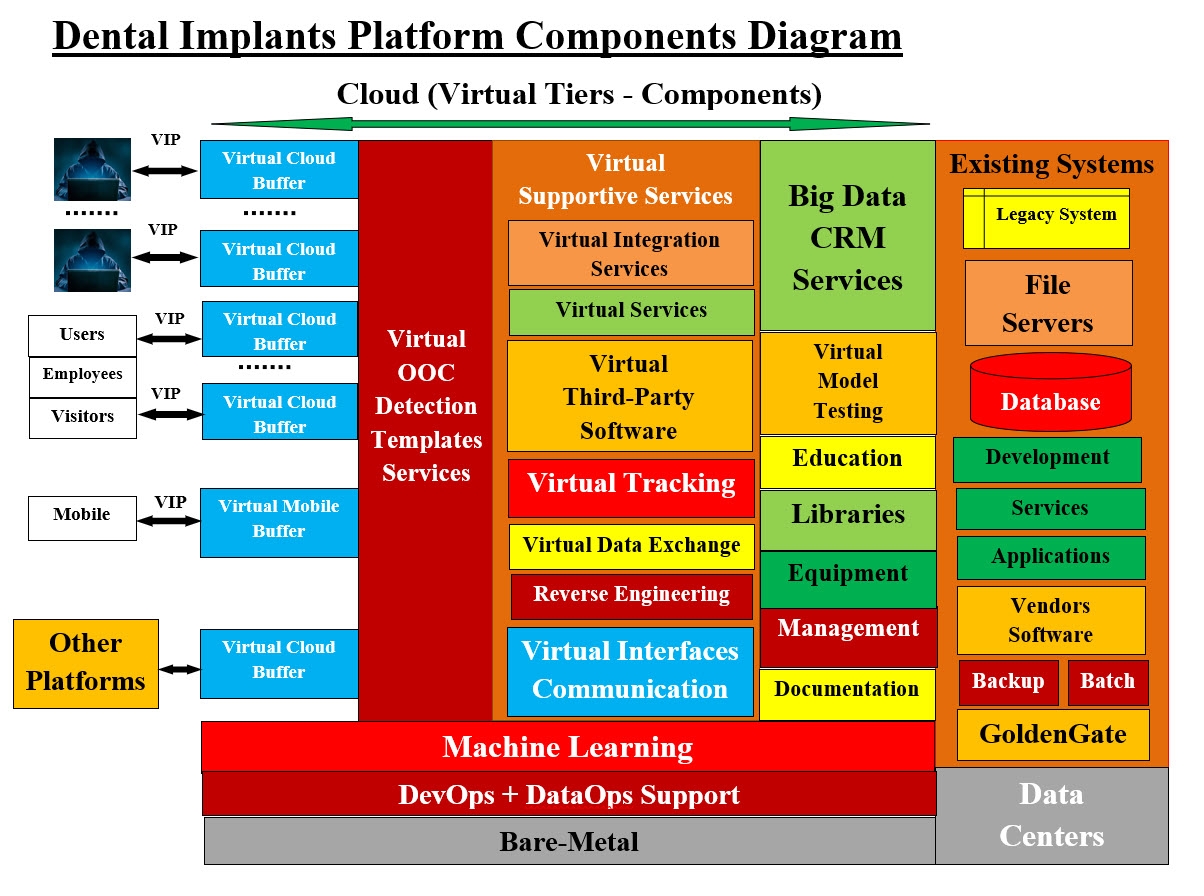
Image #3 Image #3 presents our Dental Implant platform. We recommend readers to check Our Regenerative Medicine Umbrella site and see our structuring of Our Regenerative Medicine Associated Fields: Our Regenerative Medicine Umbrella Almost all the tiers and components (Containers and Components) are virtual servers handling the entire services including Cybersecurity. Our Virtual DevOps-DataOps Containers Support verse Virtual Monolithic (Big Container) The following section is our intelligent Virtual DevOps-DataOps Containers Support verse Virtual Monolithic (Big Container). A monolithic architecture is building a large system with a single code base and deployed as a single unit, usually behind a load balancer. It typically consists of four major components: a user interface, business logic, a data interface and a database. We believe creating a virtual system or a virtual server which encompasses more than one application or services is also a monolithic system or server. Pros and cons of a monolithic architecture is leading software vendors to develop more smaller and concrete services such as Microservices. Our DevOps, DataOps Approach and Vertical and Horizontal Scaling: We view any services (Microservices, web Services, Legacy System, Applications, third party software, ..etc) as a service. Each service must run independently (stateless, Loosely Coupled, with its supporting services) within a Virtual container Server with its own Operation System and supporting software. Data (database, filing system and/or Legacy system, remote support, ..etc) would be created by DataOps as a Virtual supporting container also. The lifetime of our virtual containers (service and data service) would be the life span of the requested service. This means the checking account request in Image #4 would end and all of virtual container including the operation system and possible the hacker code would be wiped clean for next service request. As for DataOps Container, there must be some kind of end of job or house cleaning to make sure data is updated properly and secured. The DataOps container would be wiped clean also. 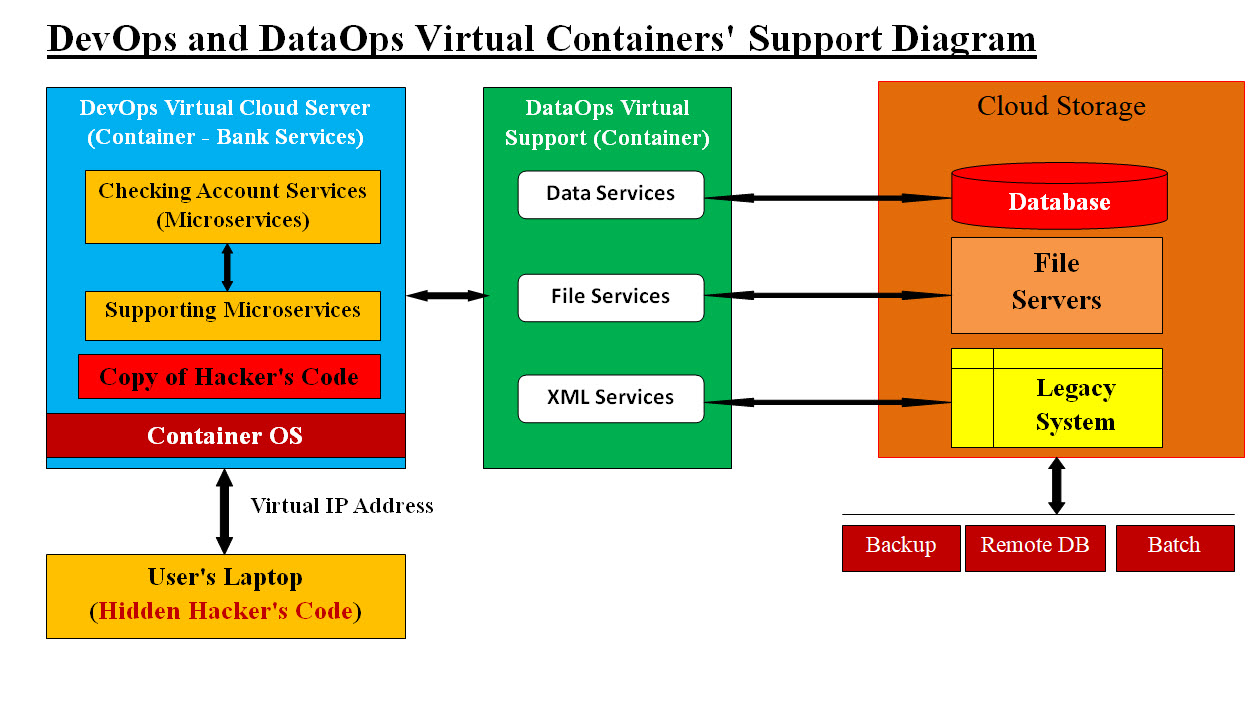
Image #4 Image #4 presents our approach to monolithic architecture where Our DevOps and DataOps would be creating the virtual servers for helping each service to run (stateless, Loosely Coupled, with its supporting services) within DevOps and DataOps containers. See the following Bank's user request scenario. Let us look at a Bank user request scenario: Let us assume a bank customer is requesting bank services plus this bank customer has virus on his/her laptop. Our system would be creating a virtual server (only exists in memory) as a container and it contains a virtual bank service application as a component running within the virtual server. The virus main objective is to copy itself on the server for further attack. It also has the Virtual Server IP (in our case it is virtual IP address) address which the virus would use for future attacks. Regardless of the virus objectives, the virtual server, the virtual bank server application and Virtual IP address would be completely deleted from memory once the virtual bank service application is done. VIP address would also be deleted so no tracking or further attachs would be possible. The Virtual Data Buffer Synchronized Services would also protect the internal data structure and access from an unauthorized access. 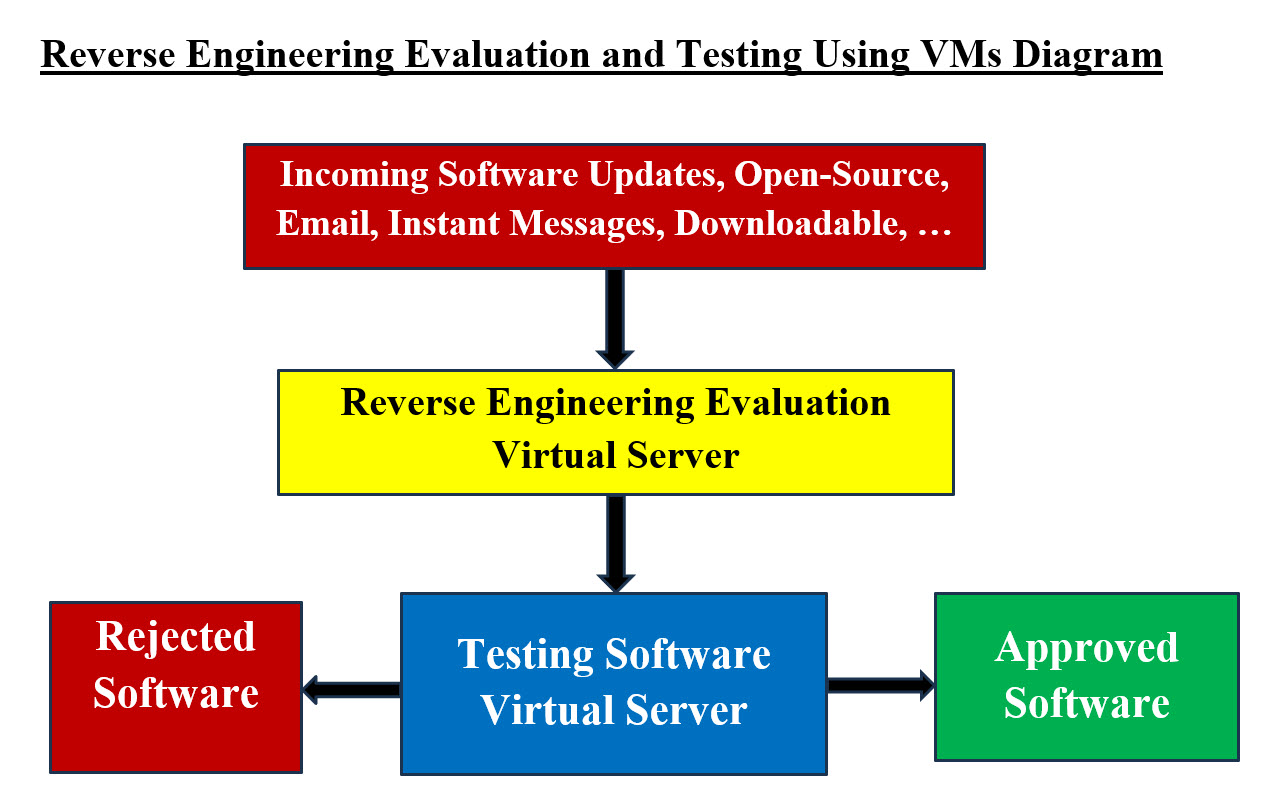
Image #5 Image #5 presents our approach of handling any 0pen-Source, software updates, email, instant messages, downloadable, or even images. We recommend using customed Reverse Engineering tools trap any malicious injection into any of incoming code, images, and so forth. Plus we have a virtual server to testing such code and figure out their intentions. |
|---|