
|
|
One Segment of Our Case Study - Autonomous Vehicles |
|---|
|
One Segment of Our Case Study - Autonomous Vehicles
Copies from Our Case Study - Autonomous Vehicles page Our Remedy Approach: We need to address Remedy based on the running applications and no one size fits all. Scanning, Tracking, Detecting and Remedy All the Internal Software and the Hardware Our Remedy and Scanning Approaches: Remedy:- we need to address Remedy based on the running applications and no size fit all. Scanning:- we would be using our Machine Learning approach. Hardware Tracking: We would need help with hardware tracking based on type and functionalities of each of the hardware and the devices. Software Tracking: Remember our Math in counting the number items running in a Data Center: 100,000 Server * (7 to 64 Virtual Server) * (8 to 32 Virtual Applications) Low number of virtual applications = 5,600,000 Virtual Application High number of virtual application = 204,800,000 Virtual Application Each bare-metal server would have between 65 to 2,048 Virtual Application Our Matrices Tree: Top Tree Matrix = 100 Groups (clusters) of bare-metal server One group Server Matrix = 1,000 bare-metal server One Bare-metal Server Matrix would have = 64 Virtual Server One Virtual Server Matrix would have = 2,048 Virtual Application Every application would a record of data Every Record would have a unique ID We are working with about 208 million record, which would require automation. Our Questions would be: How would we build five level of nesting matrices? How can these matrices be populated with the proper data? How to automate populating these matrices? First, we need to work the Data Center managers and their software tools. The matrices structure would have 5 level of matrices and every level would have a record of fields structure and within its fields structure, one field would be a matrix of the next lower level of matrices.
Table #7 - Matrices Structure Table presents the matrices data structure and we need to use Java, C-C++, scripts (Unix or Linux, Windows) to retrieve data about all the elements in Table #7. Automated Tracking and Monitoring: Our goal is automating Internal Tracking and Monitoring using software. Image #22 presents our architect of how would we be using the Operating System calls to populate a shared buffer(s) and save the data to a hard drive plus NAS for permanent storage for later analysis and evaluations. Image #22 has two sections: • Clients Cloud System • Our Cybersecurity Tracking System 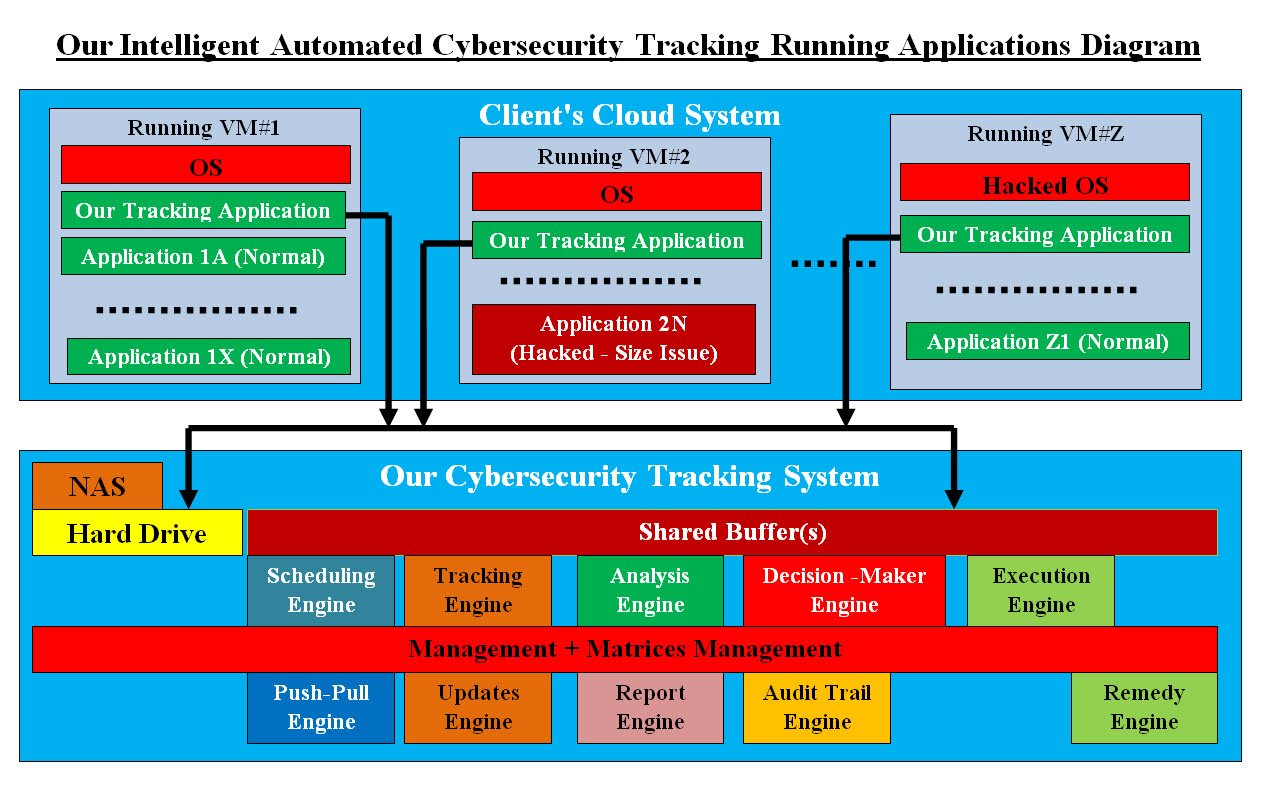
Image #22 Clients Cloud System: Clients Cloud System presents a number running virtual servers with all their internal virtual Operation System and virtual applications. One of the virtual application is our Tracking Application which we will present our sample Java code for it later in this section. Each virtual server presents one of the possible scenarios of VM#1 - a normal run, VM#2 - a hacked virtual application and VM#Z - the Operating system could possibly been hacked. The key is that our Virtual Tracking Application would make a call to the OS which the OS is running inside this virtual server. This insures that the data we are collecting is accurate and current for every running virtual server. Our Tracking Application would be receiving a stream of data about all the running virtual applications including the Operating System as follows: Windows - running the following Java code on my personal laptop - using NetBeans: try { System.out.println("Processes Reading is started..."); //Get Runtime environment of System runTime = Runtime.getRuntime(); //Execute command thru Runtime localProcess = runTime.exec("tasklist"); // For Windows //Create Inputstream for Read Processes InputStream inputStream = localProcess.getInputStream(); InputStreamReader inputStreamReader = new InputStreamReader(inputStream); BufferedReader bufferedReader = new BufferedReader(inputStreamReader); String line = bufferedReader.readLine(); int lineCount = 1; System.out.println(lineCount + ")" + line); while (line != null) { lineCount++; line = bufferedReader.readLine(); System.out.println(lineCount + ")" + line); } Print out: run: Processes Reading is started...
The output or the print out is showing the details about each running software (Image Name, PID, Session Name, Session#, and Mem Usage) and how many were running on personal laptop (205). Linux - "ps aux" Code: The ps aux command is a great tool to monitor processes running on your Linux system. It can be used to get any running program’s memory usage, processor time, and I/O resources. Tracking Application: So far, what we presented (in the code above) is how our Tracking Application would call the OS (Windows or Linux) and be able collect all the data about every running software including OS. Plus each virtual server would be called separately. There is no confusion about which virtual server has what software is running within it. Our Cybersecurity Tracking System: Our Cybersecurity Tracking System would be running in its own virtual server. There would be only system running with Management, Matrices Management, buffer(s), hard drive + NAS and as many instances of Engines as needed to handle the load. Our architect has the following components: • Management System • Matrices Management • Shared Buffer(s) • Hard drive and NAS • Engines • Tracking Engine • Analysis Engine • Decision-Maker Engine • Execution Engine • Reporting Engine • Scheduling Engine • Audit Trail Engine • Remedy Engine • Push-Pull Engine • Updates Engine Our Management System for Our Internal Cybersecurity Tracking System: Task at Hand: What is the Data Center Security Tracking Specifications? 1. Data Center may have 100,000 bare-metal Server 2. Number of items running is 208 Million software and hardware 3. Each Item has one record of all the data needed data for security tracking, audit trial and running information 4. The size of each record must be small = string of IDs (Comma Separated Value CSV) record 5. Processing speed = using numbers or Digits for IDs, size, functionalities, ..etc 6. Automating data collection in building the record 7. Use any existing world standard to create the data record or create a new one 8. All data must be shared using shared buffers, files, memory resident software or data structures, matrices 9. Develop secured sharing and access structure types for sharing data among bare-metals, virtual servers, local and remote servers 10. Processes = pipes, write to files, application calls, Push-Pull 11. Permanent storage on hard drives and NAS 12. On Demand or scheduled data population processes 13. Testing 14. Cross reference with any existing security monitoring The number of items (software and hardware) is about 208 millions, therefore automation, the performance speed, accuracy and control or the management are critical. We are using a number of software engines which would be performing all the detailed tasks. Engines are virtual applications and their number is created dynamic based on the needed tasks. These engines share data matrices where the data is created dynamically on the run. We are architecting a management system which it would be controlling the lifecycle each of these engines from cradle to grave and their communication. Our Machine Learning software tools runs a number of management and matrices control. We used Analysis, Decision-Makers and Execution Engines to perform management system. Matrices Management: Matrices are spinal cord of our Internal Cybersecurity system. We use matrices to share data on the run, where engines would be consuming the data in the these matrices. One matrix may be shared between different engines and synchronization of the needed engines is controlled be the Our Management System. These matrices are also stored on the hard drive and/or the NAS. Shared Buffer(s): Buffering is critical for speed and the use of different types and sizes records. We do need help with developing buffers which would address all the data sharing issues. Hard drive and NAS: Hard drive and NA are used as permanent storage and as well as buffering devices. |
|---|